Design Tools

ToolBench Cropper is a free, browser-based image cropping tool designed for quick and secure image adjustments without any uploads or sign-ups. It empowers users to precisely crop images to various shapes and ratios, making it ideal for content creators, social media managers, and anyone needing to prepare images for specific platforms or general web use.Key Features:Crop by hand or snap to preset ratios (Square, Circle, 16:9, 9:16, 4:3, 3:2, Freeform).Supports popular image formats: JPG, PNG, WebP, GIF, BMP.No file size limit and no sign-up required for full functionality.Batch processing allows queuing and cropping multiple images sequentially.Client-side processing ensures images are never uploaded, enhancing privacy.Specialized presets for social media, including a Circle mask for profile pictures.Use Cases:ToolBench Cropper is invaluable for optimizing images for various digital platforms. Users can easily remove distracting elements from photos, cut images to specific aspect ratios required by social media platforms like Instagram (Square, 9:16 for Stories/Reels) or YouTube (16:9 for thumbnails), and create perfectly circular profile pictures with transparent backgrounds. It's also perfect for isolating specific sections of screenshots, removing unwanted borders, or maintaining consistent framing after initial edits. The tool streamlines the workflow for preparing visual content, ensuring images look their best wherever they are displayed.Pricing Information:ToolBench Cropper is completely free to use. There are no hidden costs, subscription fees, or requirements for user registration, making it an accessible solution for everyone.User Experience and Support:The tool boasts an intuitive user interface, allowing users to easily drag and resize the crop box or select from predefined ratios. Clear instructions guide users through the cropping process, and the batch processing feature efficiently handles multiple images. While direct customer support channels are not explicitly listed, the comprehensive FAQ section and in-browser functionality aim to provide a self-service experience.Technical Details:All image processing, including cropping, occurs entirely within the user's web browser utilizing the Canvas API. This client-side execution means that images are never transmitted to a server, ensuring maximum privacy and security for user data.Pros and Cons:Pros:Completely free with no sign-up or file size limits.Enhanced privacy due to client-side processing (no uploads).Supports a wide range of image formats.Efficient batch cropping for multiple files.User-friendly interface with helpful presets.Maintains original image quality (except for JPG re-saves).Cons:Cropping is a permanent action; undo is only available before closing the tab.Lacks advanced image editing features beyond cropping.No explicit direct customer support channels mentioned.Conclusion:ToolBench Cropper delivers a secure, efficient, and highly user-friendly solution for all your image cropping needs, directly from your browser. Its strong emphasis on privacy, combined with its ease of use and versatile cropping options, makes it an excellent choice for anyone seeking hassle-free image preparation. Explore ToolBench Cropper today for seamless visual content optimization.

ScreenSize.net is a comprehensive online tool designed to empower developers, designers, and QA teams with accurate, real-time screen environment data. Its primary purpose is to simplify responsive design debugging and ensure pixel-perfect layouts across various devices by providing live metrics directly from the user's browser.Key Features:Live Screen, Window, Viewport, and Scaling Readouts that update instantly upon resizing.Device Pixel Ratio (DPR) Checker to optimize image sharpness and asset sizing.Responsive Breakpoint Checker for identifying active CSS media queries.Extensive Device Screen Sizes, including iPhone, Samsung Galaxy, and common resolutions, for comparison.Integrated Calculators: Responsive Image, PPI, Aspect Ratio, and TV Size.One-click Copyable Debug Report for easy sharing with teams or bug tickets.Use Cases:Developers and designers leverage ScreenSize.net to meticulously debug responsive layouts, guaranteeing their web applications and websites render flawlessly across a diverse range of screen configurations. The tool's live updates, which respond dynamically to browser window resizing, are invaluable for pinpointing active media queries and breakpoints, thereby significantly streamlining the development and design iteration processes.QA teams find immense value in the ability to rapidly generate a detailed report of the screen environment. This report, easily pasted into bug tracking systems, provides precise, factual data essential for reproducing and efficiently resolving layout-related issues. Furthermore, the Device Pixel Ratio information is critical for optimizing image assets, preventing common problems like blurry visuals or unnecessarily large file sizes that impact performance.Pricing Information:ScreenSize.net operates as a free online utility. All live detection and data reporting occur directly within the user's browser, with no explicit pricing plans, trials, or freemium models mentioned.User Experience and Support:The platform boasts an intuitive and highly responsive user interface, designed for ease of use. Data is read directly from the browser and updates live, offering immediate feedback. Clear definitions for key terms like 'Resolution,' 'Viewport,' and 'Device Pixel Ratio' are provided, enhancing user understanding. While specific tutorials are not detailed, the tool's self-explanatory nature and a dedicated 'Frequently asked questions' section contribute to a smooth user experience.Technical Details:The core functionality of ScreenSize.net relies on client-side browser technologies. The live detection and reporting mechanisms are executed entirely within the user's web browser, utilizing standard browser APIs to gather real-time screen, window, and viewport metrics without requiring server-side processing for individual user data.Pros and Cons:Pros: Live, real-time updates; Comprehensive screen environment data; User-friendly interface; Instant copyable debug reports; Valuable integrated calculators; Extensive device comparison data.Cons: Primarily a client-side tool, so no server-side integrations; Lacks direct integration with browser developer tools (operates as a standalone web page); No explicit API for programmatic access.Conclusion:ScreenSize.net stands as an indispensable resource for anyone engaged in responsive web development and design, delivering precise, live screen environment data crucial for modern web projects. We encourage you to explore ScreenSize.net today to simplify your responsive design debugging workflows and achieve pixel-perfect layouts across all devices.
PicText is an innovative AI image text editor designed to effortlessly modify existing text within various visual assets. It intelligently detects text in photos, screenshots, JPGs, product images, and social creatives, then replaces it while meticulously preserving the original layout, style, and background details. This tool is ideal for marketers, designers, e-commerce professionals, and anyone needing quick, high-quality text edits without complex graphic design software. Key Features AI-powered text detection and seamless replacement. Preserves original image layout, font style, color, and background details. Two distinct modes: Standard (OCR-based for clean text) and Pro (AI redraw for complex backgrounds and artistic fonts). Native text editing, integrating new text naturally rather than as simple overlays. Advanced same-font matching capabilities. Versatile support for screenshots, JPGs, PNGs, product images, posters, and social media creatives. Use Cases PicText significantly streamlines workflows for marketing and design teams. It enables rapid localization of advertising banners, event posters, and social media graphics by swapping headlines and calls-to-action across different languages and campaigns. E-commerce businesses can easily update product names, prices, and promotional copy on product photography, ensuring consistency and quick adaptation to market changes. For content creators and UI/UX professionals, PicText is invaluable for editing text within app interfaces, web page screenshots, documents, and invoices. It allows for pixel-perfect adjustments to UI copy, ensuring that interface layouts and spacing remain intact. The tool also facilitates the translation of menus, forms, and other text-heavy visuals, making content accessible to a wider audience without requiring a complete redesign. Pricing Information PicText operates on a flexible, usage-based credit system, ensuring you only pay for what you generate. The Standard mode, optimized for clean and structured text, costs 5 credits per edit. For more visually complex images, busy backgrounds, or non-standard font styles, the Pro mode is available at 10 credits per edit. User Experience and Support The platform emphasizes a clear and effortless workflow: users simply upload an image, describe the desired text change, and the AI generates the revised result. This AI-assisted approach saves hours of manual Photoshop work. While the interface is designed for ease of use, a "How-To Guide" is available to assist users in maximizing the tool's capabilities. Technical Details PicText is powered by advanced AI models, leveraging sophisticated OCR (Optical Character Recognition) for precise text detection in Standard mode and image-to-image generation with regional inpainting for seamless blending in Pro mode. This ensures that new text integrates naturally into the original image's composition and visual styling. Pros and Cons Pros: Highly efficient AI-driven text replacement. Maintains original design integrity (layout, style, background). Offers specialized modes for different image complexities. Reduces manual editing time significantly. Supports a wide range of image types and use cases. Cons: Credit-based pricing requires usage monitoring. Specific AI instructions might have a slight learning curve for optimal results. No explicit mention of a free trial or freemium tier in the provided text. Conclusion PicText stands out as a powerful and versatile AI image text editor, offering an unparalleled solution for modifying text within visual content while preserving its original aesthetic. Its intelligent capabilities make it an essential tool for anyone looking to quickly and flawlessly update images for marketing, localization, or content creation. Explore the editor today to transform your image editing workflow.
StudioCreate+: Unleash Your Creativity in 2D, 3D, and 360° StudioCreate+ is a powerful digital drawing and painting application designed specifically for Windows users. It provides a comprehensive suite of tools for creating stunning artwork, illustrations, and sketches across 2D, 3D, and immersive 360° environments. This versatile SAAS caters to both beginners and professional artists, illustrators, and designers looking for an intuitive yet advanced creative platform to bring their visions to life. Key Features Extensive Brush Library: Offers a wide range of customizable brushes for diverse artistic styles and textures. Advanced Layer Management: Supports complex compositions with robust layer organization and blending modes. 2D, 3D, & 360° Creation: Unique capability to work across traditional 2D art, 3D modeling, and panoramic 360° scenes. Intuitive User Interface: Designed for ease of use, making it accessible for beginners while providing depth for professionals. High-Quality Output: Tools to create professional-grade artwork, illustrations, and sketches. Use Cases Artists can utilize StudioCreate+ to bring their imaginative concepts to life, from detailed character designs and vibrant landscapes in 2D to immersive 3D models and panoramic 360° scenes. Its versatile brush engine and layer system make it ideal for digital painting, concept art, comic book illustration, and even creating assets for games or virtual reality experiences. The ability to work in 360° opens up new avenues for environmental art and immersive storytelling. For illustrators and designers, the app serves as a robust platform for creating professional-grade illustrations for books, magazines, and digital media. Designers can leverage its capabilities for prototyping visual concepts, storyboarding, and developing visual assets for various projects, benefiting from its ability to handle diverse creative demands. Whether you're sketching an initial idea or finalizing a detailed piece, StudioCreate+ provides the tools needed for every stage of the creative process. Pricing Information Specific pricing details for StudioCreate+ are not provided in the available content. Users are encouraged to visit the official StudioCreate+ website for the most current information on subscription plans, one-time purchase options, or any available free trials. User Experience and Support StudioCreate+ boasts an intuitive interface, making it accessible for beginners while offering the depth required by professionals. The focus on ease of use ensures a smooth creative workflow, allowing artists to concentrate on their art rather than struggling with complex menus. While specific details on documentation or support channels are not provided, a powerful application of this caliber typically includes comprehensive in-app help, tutorials, and potentially a community forum for user assistance. Technical Details StudioCreate+ is developed as a dedicated application for the Windows operating system. The provided content does not specify the underlying programming languages, frameworks, or specific technologies used in its development. Its native Windows integration suggests optimized performance for the platform. Pros and Cons Pros: Versatile 2D, 3D, and 360° creation capabilities in one app. Wide range of brushes and advanced drawing tools. Intuitive interface suitable for all skill levels. Powerful for digital drawing, painting, and illustration. Dedicated Windows application for optimized performance. Cons: Platform limited to Windows (no mention of Mac/Linux/web versions). Specific pricing details are not explicitly provided. No explicit mention of advanced collaboration features. Potential learning curve for mastering advanced 3D/360° features. Conclusion StudioCreate+ stands out as a comprehensive digital art studio for Windows, empowering users to explore their creativity across multiple dimensions, from traditional 2D to immersive 360°. Its blend of powerful features and user-friendliness makes it an excellent choice for anyone serious about digital art and illustration. Visit the official StudioCreate+ website to unleash your artistic potential and transform your ideas into stunning visuals.
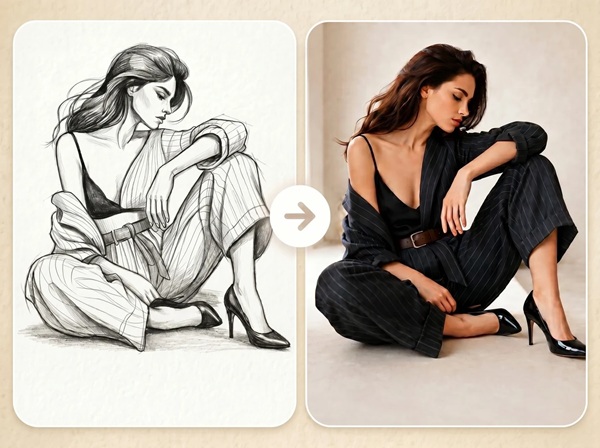
Fast Image AI Sketch to Image:Upload any sketch and turn it into a detailed AI-generated image in seconds—create realistic artwork, product concepts, interior design visuals, character ideas, and more.

Live Font Generator is a powerful and free online tool designed to transform ordinary text into captivating, unique font styles instantly. It serves as an essential resource for anyone looking to elevate their digital presence, from social media enthusiasts and gamers to marketers and content creators.This platform is ideal for individuals and businesses aiming to make their posts, bios, messages, and usernames stand out across various online platforms. Key Features: 200+ Unique Font Styles: Offers an extensive library of Unicode-based styles including Catcher Style, Sword Slash, Neon Glow, Vapor Wave, Cyber Punk, Old English, and glitch effects, with new additions regularly. Instant Text Conversion: Type your text and watch stunning fonts appear in real-time, allowing for immediate preview. One-Click Copy & Paste: Easily copy any generated font style to your clipboard for seamless integration into any application. No Downloads or Installations: A completely browser-based solution, eliminating the need for software downloads, plugins, or extensions. Universal Compatibility: Utilizes Unicode characters, ensuring generated fonts work perfectly across Instagram, Facebook, X (Twitter), TikTok, Discord, WhatsApp, gaming platforms, and more. Mobile-Friendly & Fast: Optimized for performance and responsiveness across all devices, including smartphones and tablets. Use Cases: Live Font Generator offers unparalleled versatility for enhancing digital text. On social media, it allows users to craft eye-catching Instagram bios, stylish photo captions, and engaging story stickers. For platforms like X (Twitter) and Facebook, it enables users to add italic-like flair or emphasize specific words in tweets and posts, making content more memorable. Beyond the major platforms, these styles are fully compatible with Threads, Reddit, and various online forums that support Unicode symbols. In messaging, the tool ensures that conversations on WhatsApp, Telegram, and Signal are more expressive and personalized. Marketers can leverage fancy fonts in advertisements on Instagram or Facebook to grab attention and stop the scroll. For productivity, users can paste styled text directly into Notion, OneNote, or Excel to highlight important notes without needing extra formatting tools. Gamers can create unique and memorable usernames for platforms like Roblox, Minecraft, and Steam, while creative individuals can even generate unique QR codes using styled text. Pricing Information: Live Font Generator is 100% free to use. There are no hidden charges, paywalls, or subscriptions required to access any of its 200+ font styles. Users can enjoy all features without any cost. User Experience and Support: The platform boasts a highly intuitive and user-friendly interface. Users simply type their text into an input box, and hundreds of creative fonts are generated instantly for real-time preview. The one-click copy button simplifies the process of using the styled text. Its mobile-friendly design ensures a seamless experience across all devices. While direct customer support channels are not explicitly mentioned, a comprehensive FAQ section addresses common queries, and a "Add to Favorites" feature enhances user convenience by saving preferred styles in the browser. Technical Details: Live Font Generator operates as a web-based application, leveraging standard Unicode characters to create its diverse range of font styles. This approach ensures broad compatibility across virtually all modern digital platforms and browsers. The tool functions entirely within the user's browser, requiring no external software or plugins, which contributes to its speed and ease of access. Pros: Extensive library of over 200 unique and creative font styles. Completely free with no hidden costs or subscriptions. Browser-based, requiring no downloads or installations. High compatibility across social media, messaging, and gaming platforms due to Unicode. Extremely easy to use with instant generation and one-click copy. Mobile-friendly and fast performance. Allows for personal and commercial use without restrictions. Cons: No advanced text customization options beyond style selection (e.g., color, precise sizing). Relies solely on Unicode, which means some highly specialized fonts might not be available. No explicit API or integration options for developers. Limited direct customer support channels mentioned beyond FAQs. No offline functionality as it's a web-based tool. Conclusion: Live Font Generator stands out as an incredibly versatile and accessible tool for anyone looking to add a unique flair to their digital text. Its vast collection of free, Unicode-based fonts and straightforward operation make it an indispensable asset for personal expression and professional branding alike. Explore Live Font Generator today to transform your text and make your online presence truly unforgettable.

AIMakeTattooAI is an innovative AI-powered platform designed to transform tattoo ideas into custom designs, lettering, and practical notes in seconds. It caters to individuals seeking to visualize their next tattoo and artists looking for inspiration and design tools.Key Features:AI Tattoo Generator: Converts descriptive ideas into custom tattoo designs with style, placement, detail, and ratio controls.AI Tattoo Lettering Generator: Creates custom AI lettering designs for names, dates, quotes, with symbols, ornaments, shading, and frames.Image to Tattoo: Transforms uploaded photos, sketches, or personal images into tattoo designs across various styles.Tattoo Font Generator: Instantly previews text across tattoo-friendly font styles (script, Old English, Roman) without using AI credits.Extensive Style Library: Offers popular tattoo styles like Neo Traditional, Japanese, Blackwork, Realism, and Watercolor.Free Daily Uses: Provides free daily generations for AI Tattoo, AI Lettering, and Image-to-Tattoo tools.Use Cases:AIMakeTattooAI is invaluable for anyone planning a new tattoo, from first-timers to seasoned enthusiasts. Users can describe abstract concepts like "dragon flying over mountains in Japanese style" and instantly receive visual designs, allowing for rapid iteration and exploration of different artistic directions. This eliminates the need for extensive manual searching or mood board creation, significantly speeding up the initial planning phase.The platform also excels in personalizing text-based tattoos. Whether it's a significant date, a loved one's name, or a meaningful quote, the AI Lettering Generator can craft unique designs with intricate details, ensuring the text is not just legible but also artistically integrated. Furthermore, the Image to Tattoo feature allows for deeply personal designs, turning a cherished photo or a child's drawing into a potential tattoo concept, bridging the gap between personal memory and artistic execution.Pricing Information:AIMakeTattooAI operates on a freemium model. The Tattoo Font Generator is completely free to use and does not require AI credits. The AI Tattoo Generator, AI Lettering Generator, and Image-to-Tattoo tools offer free daily uses, with optional paid credits available for users who require more generations.User Experience and Support:The platform is designed for ease of use, allowing users to start exploring tattoo ideas without complex profile creation or lengthy questionnaires. Its intuitive interface enables quick generation and comparison of designs. While specific support documentation isn't detailed, the presence of a "Frequently Asked Questions" section and a contact email (hello@aimaketattoo.com) suggests accessible user support.Technical Details:Based on the provided information, AIMakeTattooAI is a web-based SaaS application leveraging artificial intelligence for design and lettering generation. Specific programming languages or frameworks are not disclosed, but its functionality points to advanced AI/ML capabilities for image and text synthesis.Pros and Cons:Pros:Rapid generation of diverse tattoo designs from text prompts.Comprehensive tools for both image-based and text-based tattoo concepts.Ability to explore multiple styles and compositions quickly.Free daily uses and a completely free font preview tool.Streamlines the tattoo planning process, saving time and effort.No complex setup required to start designing.Cons:Reliance on AI may require refinement by a human artist for final execution.Specific customization options beyond initial controls might be limited.No explicit mention of advanced collaboration features for artists.Paid credits needed for extensive daily use beyond the free tier.Conclusion:AIMakeTattooAI offers a powerful and accessible suite of AI tools for anyone looking to design their next tattoo. By transforming ideas into visual concepts, exploring styles, and customizing lettering, it significantly enhances the tattoo planning journey. Explore AIMakeTattooAI today to bring your tattoo vision to life faster and more creatively.

ElectricianCalc.com is a comprehensive suite of free, NEC-compliant electrical calculators and tools, meticulously built by an electrician for professionals in the field. Its primary purpose is to provide accurate, real-time electrical calculations for wire sizing, voltage drop, and load analysis, ensuring safe and code-compliant installations. This SaaS is specifically designed for electricians, electrical engineers, and contractors who require reliable tools for their daily projects and bid planning. Key Features: NEC Compliant: All calculations adhere strictly to National Electrical Code standards and industry best practices. Instant Results: Provides real-time feedback and comprehensive analysis for quick decision-making. Mobile Ready: Responsive design ensures seamless functionality across phones, tablets, and desktop computers. Accurate Wire Sizing: Considers load current, distance, voltage drop limits, and temperature for optimal wire selection. Comprehensive Load Calculations: Handles residential, commercial, and industrial loads for panel, breaker, and feeder sizing. Voltage Drop Analysis: Helps meet NEC 3% and 5% limits to prevent equipment performance issues. Use Cases: ElectricianCalc.com is invaluable for various scenarios in electrical installation and design. For instance, when selecting the correct wire size, the platform prevents costly errors and code violations by factoring in critical variables like load, distance, and environmental conditions. This ensures both safety and material efficiency. Furthermore, the tool simplifies complex load calculations, which are essential for accurately sizing electrical panels, circuit breakers, and feeders. This is particularly useful for preparing permit applications and passing electrical inspections, streamlining the project approval process. It also addresses common voltage drop issues on long wire runs, helping users identify and mitigate potential problems that could lead to motor burnout or lighting inefficiencies, thereby extending equipment lifespan and maintaining performance. Pricing Information: ElectricianCalc.com is completely free to use, offering all its electrical tools and calculators at no cost to electricians, engineers, and contractors. There are no hidden fees or subscription models, making it an accessible resource for everyone in the industry. User Experience and Support: The platform boasts a responsive and intuitive design, making it easy to use on any device, from a desktop in the office to a tablet or phone on the job site. While direct support channels aren't explicitly detailed, the "Contact Me" option suggests direct communication with the creator. The site's "Built by an electrician, for electricians" ethos implies a user-centric design focused on practical utility. Technical Details: ElectricianCalc.com operates as a web-based application, accessible through any modern browser. While specific programming languages or frameworks are not disclosed, its responsive design and real-time calculation capabilities indicate a robust web development foundation. Pros and Cons: Pros: NEC compliant and highly accurate calculations. Completely free to use, reducing operational costs. Mobile-ready for on-the-go access and calculations. Helps prevent code violations and costly material errors. Simplifies complex electrical engineering tasks. Cons: No explicit mention of advanced integration features. Requires manual verification for official exams. Disclaimer advises professional consultation, not a standalone solution. Limited information on direct customer support channels. Conclusion: ElectricianCalc.com provides an essential, free resource for electrical professionals, offering accurate, NEC-compliant tools for critical calculations. Its ease of use and mobile accessibility make it an indispensable asset for ensuring safe, efficient, and code-adherent electrical installations. Explore ElectricianCalc.com today to streamline your electrical projects and enhance your professional practice.
Create QR codes online for free! No signup, no watermarks, no limits. Generate codes for URLs, text, email, phone numbers, and WiFi, then customize colors, size, and error correction. Download as PNG or SVG, or copy to the clipboard. Everything runs 100% in your browser, so your data (even WiFi passwords) never leaves your device. A simple, private alternative to QR Monkey and Adobe's QR generator.